¶ falcond - Advanced Linux Gaming Performance Daemon
falcond is a powerful system daemon designed to automatically optimize your Linux gaming experience. It intelligently manages system resources and performance settings on a per-game basis, eliminating the need to manually configure settings for each game.
¶ Features
- Automatic Game Detection: Automatically detects running games and applies optimized settings
- Per-Game Profiles: Customizable profiles for different games
- Performance Mode: Enables system-wide performance optimizations when gaming
- 3D vcache Management: Smart management of AMD 3D vcache settings
- SCX Scheduler Integration: Dynamically pick a scheduler that is best for the specific game
- Proton Compatibility: Full support for Steam Proton games, with a global profile for excellent game coverage
- Low Overhead: Minimal system resource usage
- Different Device Modes: Profiles for desktops, handhelds, HTPC etc
¶ Installation
falcond is available on PikaOS via the falcond package or via the Pika Gameutils Metapackage. It's also packaged by our friends at Nobara, and CachyOS. For other distributions, please check your package manager or build from source.
¶ Configuration
The configuration file is located at /etc/falcond/config.conf. Here's an example configuration, it will be generated automatically on first run:
enable_performance_mode = true
scx_sched = none
scx_sched_props = default
vcache_mode = none
profile_mode = none
This is global configuration and all options other than profile_mode override individual game profiles.
There is also a list of proton/wine system processes in /usr/share/falcond/system.conf. This list can be updated if for example a crash handler is intercepting your profile and needs to be ignored.
¶ Configuration Options
enable_performance_mode: Enable/disable performance mode (default: true)scx_sched: SCX scheduler (options: none, bpfland, lavd, rusty, flash)scx_sched_props: SCX scheduler mode (options: default, gaming, power, latency, server)vcache_mode: VCache management mode (options: none, cache, freq)profile_mode: What type of device is in use, none means desktop (options: none, handheld, htpc)
¶ Profile Modes
Falcond now supports different profile modes for different device types:
- Default (none): Uses profiles from
/usr/share/falcond/profiles - Handheld: Uses profiles from
/usr/share/falcond/profiles/handheld - HTPC: Uses profiles from
/usr/share/falcond/profiles/htpc
To set a profile mode, add this to your config file:
profile_mode = "handheld" # or "htpc" or "none"
¶ Game Profiles
Game profiles are stored in /usr/share/falcond/profiles/ and define specific optimizations for individual games. You can contribute new profiles via PR at:
Falcond Profiles Repository
Example profile:
name = "game.exe"
performance_mode = true
scx_sched = bpfland
scx_sched_props = gaming
vcache_mode = cache
start_script = "/home/ferreo/start.sh"
stop_script = "notify-send 'game stopped'"
¶ Available Options
name: The exe name (examples: cs2, PathOfExileSteam.exe)performance_mode: Enable/disable performance mode (default: true)scx_sched: SCX scheduler (options: none, bpfland, lavd, rusty, flash, central, cosmos, layered, nest, qmap, rlfifo, rustland, userland, p2dq, tickless)scx_sched_props: SCX scheduler mode (options: none, gaming, power, latency, server)vcache_mode: VCache management mode (options: none, cache, freq)start_script: Script to run when the game startsstop_script: Script to run when the game stopsidle_inhibit: Prevent screensaver/idle while game is running (default: false)
¶ User Profiles
falcond supports user-specific profiles that override system profiles. User profiles are stored in /usr/share/falcond/profiles/user/ and take precedence over system profiles with the same name. This allows you to customize game settings without modifying system files.
To create a user profile:
- Create the directory if it doesn't exist:
sudo mkdir -p /usr/share/falcond/profiles/user/ - Create a profile file with the game's name:
sudo nano /usr/share/falcond/profiles/user/game.conf - Add your custom settings
User profiles follow the same format as system profiles but will override any system profile with the same name. If a user profile doesn't exist for a game, the system profile will be used.
¶ Service Management
To restart the daemon:
sudo systemctl restart falcond
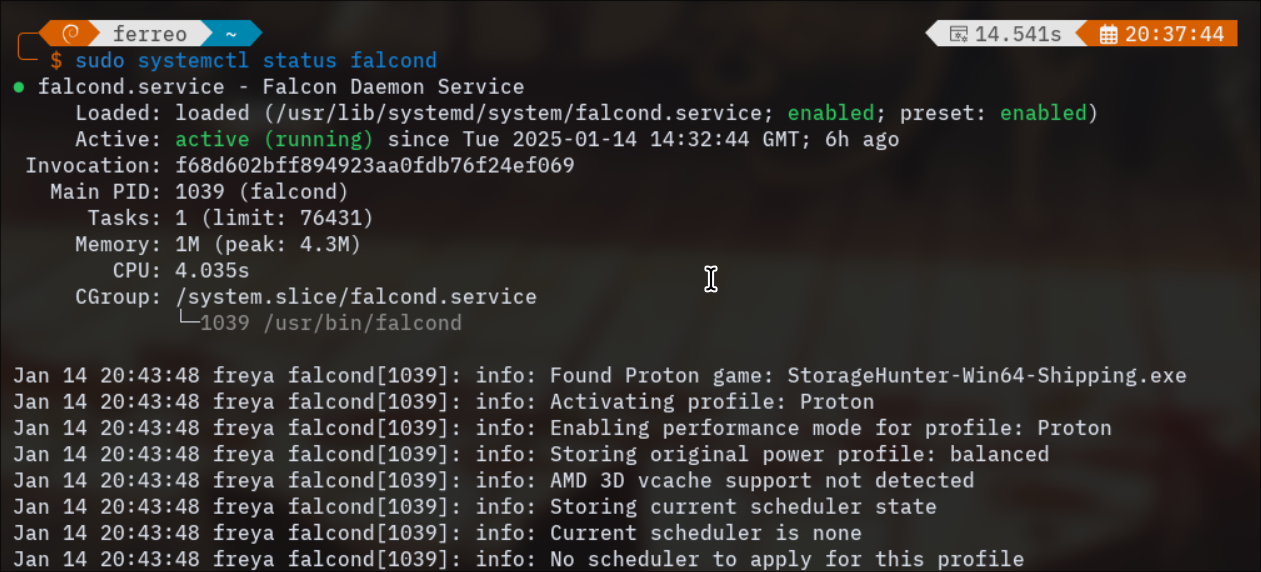
To check the status:
sudo systemctl status falcond
¶ Monitoring
You can check the detailed status of falcond by reading the status file (it is also available in /tmp/falcond-status for apps like mangohud):
cat /var/lib/falcond/status
Example output:
FEATURES:
  Performance Mode: Available

CONFIG:
  Profile Mode: none
  Global VCache Mode: none
  Global SCX Scheduler: none

AVAILABLE_SCX_SCHEDULERS:
  - scx_bpfland
  - scx_cosmos
  - scx_flash
  - scx_lavd
  - scx_p2dq
  - scx_tickless
  - scx_rustland
  - scx_rusty

LOADED_PROFILES: 7

ACTIVE_PROFILE: cs2

QUEUED_PROFILES:
  (None)

RESTORE_STATE:
  SCX Scheduler: (None)
  Power Profile: power-saver

CURRENT_STATUS:
  Performance Mode: Active
  VCache Mode: cache
  SCX Scheduler: none
  Screensaver Inhibit: Active
¶ Source Code
The source code for falcond can be found at:
Falcond Source Repository
¶ Important Notes
⚠️ Compatibility Warning ⚠️ falcond should not be used alongside Feral GameMode or Falcon GameMode as they may conflict with each other. falcond provides similar functionality with additional features and optimizations.
¶ Why falcond?
Traditional gaming on Linux often requires manual optimization for each game - tweaking CPU governors, scheduling priorities, and cache settings. falcond automates this entire process by:
- Automatically detecting when games are running
- Applying optimized settings based on pre-configured profiles
- Reverting settings when games are closed
- Providing a centralized way to manage gaming performance
- Easy switching of options for different device types
This means you can focus on gaming while falcond handles all the technical optimizations in the background!